> For the complete documentation index, see [llms.txt](https://docs.udara360.io/llms.txt). Markdown versions of documentation pages are available by appending `.md` to page URLs; this page is available as [Markdown](https://docs.udara360.io/core-features/reports/credit-and-loan-reports/loan-and-advances.md).
# Loan and Advances
The Loan and Advances Report gives you a detailed view of all active loan and advance accounts across Udara360. Use this report to monitor portfolio performance, track outstanding balances, review repayment progress, and identify accounts that are past due. This guide will walk you through accessing, filtering, and exporting the Loan and Advances Report.
## Accessing Loan and Advances
1. Log into the application using your credentials.
2. From the dashboard, navigate to **Reports** in the side menu.
3. Expand **Credit & Loan Reports** and Select **Loan and Advances** from the dropdown list
## Exporting the Report
1. Click the **Export** button at the top left of the page
2. Select your preferred format; **CSV** or **Excel**
3. The file will download automatically to your device
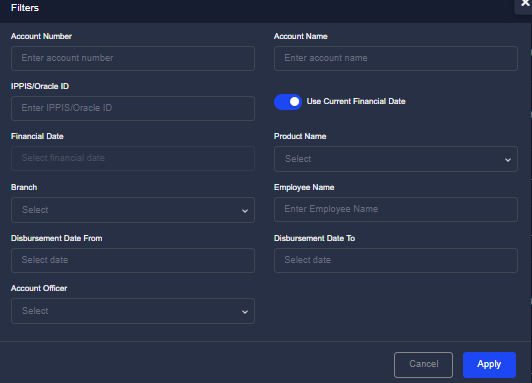
## Filtering the Report
1. Click the **Filter** button at the top right of the page
2. Enter your preferred filter criteria
3. Click **Apply** to display the filtered results
> 📌 Click **Reset Filter** to clear all applied filters and return to the full report.